アプリ関連ニュース
- 2021年7月30日
- 技術情報
Flutter – Aspect Ratio Widget
These days I studies flutter widgets a lot. From these studies, I would like to share you one thing – this is the importance of aspect ratio and how to use this widget.
Care about proportions more than exact dimensions?
When laying out your app, you often don’t care about the exact dimensions of which it will take. But you do care about the aspect ratio. You want the widget to be this wide irrespective of the actual dimensions or you want it to be slim or exactly square. Flutter solves this by providing the Aspect Ratio widget.
AspectRatio()you give it an AspectRatio, a child, and, well , that’s it.
AspectRatio(
 aspectRatio: 3 / 2,
child:  MyWidget(),
)
Aspect ratio is the ratio between the width and height of a box. It’s often written as a fraction, like 3/2, as in three parts of width to two parts of height. But let’s not kid ourselves – it’s really just a double: 3 over 2 is just 3 divided by 2, which is 1.5 – the same thing.
AspectRatio(
 aspectRatio: 1.5,
child:  MyWidget(),
)
But don’t worry! Dart is smart enough to do the computation for you during compilation. So it’s okay and more readable to provide the aspect ratio as a fraction.
And one more thing – make sure you actually let the AspectRatio widget size it’s child. If you put AspectRatio into something like Expanded, then that will be forced by it’s parent to expand.
Expanded(
 child: AspectRatio(
  aspectRatio: 3 / 2,
  child: MyWidget(),
 ),
)
Tightly fitted widgets like Expanded don’t give their children a choice- harsh. If this happens to you, just put something like Align between the Expanded and the AspectRatio.
Expanded(
 child: Align(
 alignment: Alignment.bottomCenter,
  child: AspectRatio(
   aspectRatio: 3 / 2,
   child: MyWidget(),
  ),
 ),
)
Align will be forced by Expanded to fill the area. But it will let it’s child assume it’s own proportions.
Hope you enjoyed the article!
By Ami

asahi at 2021年07月30日 10:00:58
- 2021年7月28日
- Android
Flutterを使ってAndroidアプリを作ろう
tanaka at 2021年07月28日 10:00:58
Flutterの開発環境を構築しよう
tanaka at 2021年07月21日 10:00:10
- 2021年7月19日
- 技術情報
Rare HTML tags you mightn’t notice
Today I will talk about some html tags which are not very well-known but of course they are so useful if you know them. So lets get started.
<s> tag
S tag similar to the line-through value of a text decoration CSS property. This is very useful when you need to represent content that is no longer relevant or valid.
Price - <s>100</s>
<p>Discount Price - 70<p>
<ruby>, <rt>, and <rp> tags
The Ruby <ruby> HTML element represents small annotations that are rendered above, below, or next to base text, usually used for showing the pronunciation of East Asian characters.
The HTML Ruby fallback bracket () element is used to provide fallback brackets to browsers that do not support the display of ruby annotations using the element.
<ruby>
  お休み <rp>(</rp><rt>Oyasumi</rt><rp>)</rp>
</ruby>
<detail> Tag
This tag is used to specify additional details that the user can show or hide on click.
<details>
<summary>Click</summary>
<p>Helo</p>
</details>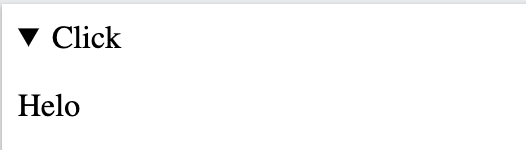
<abbr> tag
The tag displays the full meaning of the abbreviation when the user hovers the cursor over the abbreviation.
<p>My name is <abbr title="Hlaing Tin Htun">Hlaing</abbr> </p>
Well , there are some other interesting tags you probably don’t know yet. Discovering them might be very useful in our daily works relating with creating HTML elements.
Yuuma
yuuma at 2021年07月19日 11:41:13
- 2021年7月12日
- Web Service
A touch to serverless framework – final part
We have created our serverless endpoint last week and lets tweak a bit more today by adding some parameters to our endpoint. Lets get started.
We don’t have to modify serverless.yml and lets keep the same way we did before.
events:
      - http:
          path: sample-endpoint
          method: GET
Lets modify the handler.js as we are adding a name parameter to our endpoint and get a different response depending on the input parameter. We will add a conditional statement for our name parameter in our handler.js like this.
if (event.queryStringParameters && event.queryStringParameters.name) {
    return {
      statusCode: 200,
      body: JSON.stringify(
        {
          message: 'Hello' + event.queryStringParameters.name,
          input: event,
        },
        null,
        2
      ),
    };
  }
So this will be our final result of handler.js
'use strict';

module.exports.hello = async (event) => {


  if (event.queryStringParameters && event.queryStringParameters.name) {
    return {
      statusCode: 200,
      body: JSON.stringify(
        {
          message: 'Hello' + event.queryStringParameters.name,
          input: event,
        },
        null,
        2
      ),
    };
  }

  return {
    statusCode: 200,
    body: JSON.stringify(
      {
        message: 'Go Serverless v1.0! Your function executed successfully!',
        input: event,
      },
      null,
      2
    ),
  }
};
Lets deploy our code and see the result.
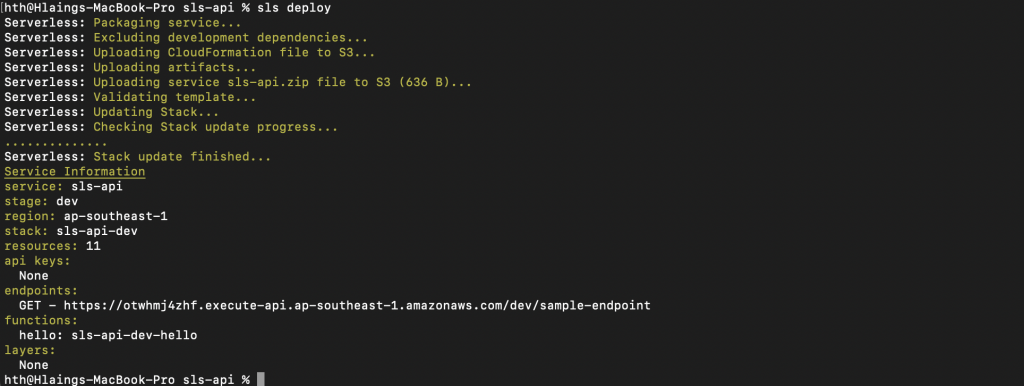
Lets go to the endpoint from the browser but this time we will add a name parameter at the end of the url like this
?name=HlaingAs a final result, we will get a response like this.
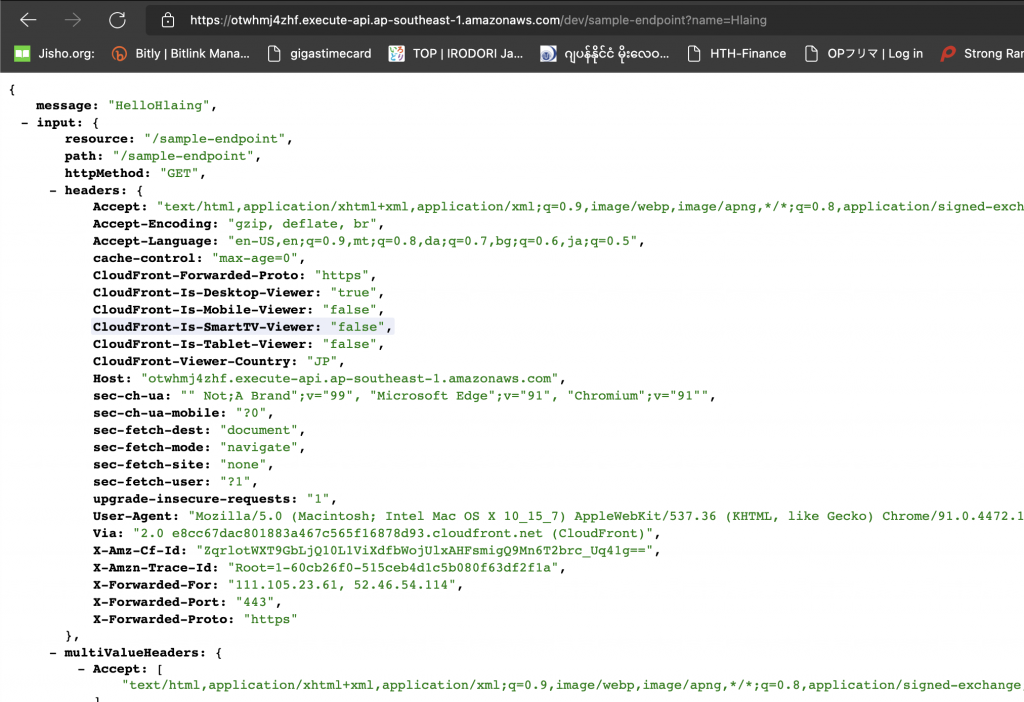
You can see the result of our name parameter in the json response of message data.
That’s all for today and we have successfully added a new parameter to our endpoint.
As a conclusion note, I have to say we can still do many things through this serverless project. We can also create other method type endpoint like POST. We can also create services like S3 buckets, DBs and so on through serverless.yml and deploying it. But let me stop the article series here as I also intended to get you a starting point to the serverless framework and I think you got it.
See you again . Yuuma
yuuma at 2021年07月12日 11:00:25
 大人が楽しめるヒーリング絵本河童のカパと静かな森
 パワースポット 日本三大神滝布引の滝
 佐藤・広幸ドイツ魂
 Himeji Castle姫路城
 ボイドタイムお知らせアプリVoid Time 〜月を無視できない〜
 撮った写真をカレンダーに撮りカレ
 ライブ壁紙竹田城ライブ壁紙
 赤ちゃんにっこりBaby+Smile
 電子書籍[for iPhone]ターラのアストロロジー
 Vue.js コンパイルするときのポイント
 翻訳や文字起こしを視界の中へ――AIスマートグラス「INMO GO3」が国内発売