アプリ関連ニュース
iPhone 13
After much speculation, Apple will host an event on September 14 and it will most likely be the debut of the iPhone 13.
Apple has confirmed this through an event poster it sent to the press, which very clearly marks the September 14 launch event. Apple’s senior vice president of marketing tweeted this short clip, not hinting at any device though.
Design
They are expected to change little from the iPhone 12, but it appears that the company will change the design of the rear camera. It will apparently have a diagonal lens arrangement.
Color
Apple may introduce some new shades with the iPhone 13 series, with two versions rumored to be pink and orange. Along with them, we expect to see shades similar to those of the last generation, such as purple, black and white.
Display
Screen sizes and resolutions are expected to remain the same across the entire iPhone 13 product line, but both the iPhone 13 Pro and iPhone 13 Pro Max are rumored to debut with 120Hz refresh rates. That means the image on these screens will be smoother than on previous iPhones.
Camera
Apple is expected to be tweaking the camera on the iPhone 13 series, and the two Pro phones can get an improved ultra-wide shooter. The iPhone 13 Pro may also have an improved telephoto camera, plus some leaks suggest LiDAR could be present in all four models, so it will have improved depth perception, although the most recent leaks don’t mention this.
Others
The A15 chipset will likely power each of these phones, although current reports suggest this won’t bring a huge power boost. It is also widely rumored that Apple may release a 1TB iPhone for the first time in 2021, thus allowing for the largest iPhone sizes ever. You can also expect a bigger battery inside the 2021 phones. They are expected to be noticeably larger, expecting an iPhone 13 more durable than your previous iPhones.
Yuuma

yuuma at 2021年09月13日 10:20:00
- 2021年9月10日
- 技術情報
Flutter – Clipboard
This week also let’s learn flutter new things. I will show you how to copy and paste a text with flutter. Let’s start coding.


First thing we need to do is add this clipboard package in pubspec.yaml file.
flutter pub add clipboardCopy to clipboard
FlutterClipboard.copy(field.text).then(( value ) => print('copied'));Paste from clipboard
FlutterClipboard.paste().then((value) {
    // Do what ever you want with the value.
    setState(() {
      field.text = value;
      pasteValue = value;
    });
  });
For text editing field :
TextEditingController field = TextEditingController();
TextFormField(
                controller: field,
                decoration: const InputDecoration(
                    hintText: 'Enter text'
                ),
              ),
Hope you enjoyed this article!
By ami
asahi at 2021年09月10日 10:00:00
GPUマイニングをやってみました
tanaka at 2021年09月08日 10:00:05
- 2021年9月06日
- Web Service
The structure of JWT
I talked about JWT last week and we get the basic idea of what is JWT, how it works etc. Today I will talk about the structure of JWT and its pros and cons.
If you haven’t read about JWT, you can read it here. So lets get started.
A JWT contains 3 parts separated by a “.” sign. These are header, payload and signature.
You can also take a look and can play debugging of these three parts at the official website of JWT called jwt.io
Header
Header contains the type of token and algorithm used for signing and encoding. Algorithms can be HMAC, SHA256, RSA, HS256 or RS256.
{
  "typ": "JWT",
  "alg": "HS256"
}
Payload
Payload contains the data we are exchange through client and server. Here is the sample payload.
{
  "uid": "1234567890",
  "name": "yuuma",
  "iat": 1231313123
}
We can also add expiration payload to add expiration date of that token. We have to be careful about sensitive informations since, JWT can be decoded easily.
Signature
Signatures are the most important part of JWT. It is calculated by encoding the header and payload using the Base64url encoding and concatenating them with a dot sign. This is then passed to the encryption algorithm. If he header or payload changes, signature has to calculated again.
//sample from jwt.io
HMACSHA256(
  base64UrlEncode(header) + "." +
  base64UrlEncode(payload),
  your-256-bit-secret
) secret base64 encoded
Tips
We have to be careful about these facts if we are using JWT token in your authorization mechanism
- Use HTTPS to protect the Authorization header.
- Better to prepare with blocklist tokens as the attacker might get JWT token before it’s expiration date.
- If the JWT is cookie-persistent, you need to create an HttpOnlyCookie. This restricts third-party JavaScript from reading the JWT token from the cookie.
- For XSS, the server side should always sanitize user-generated data.
- For CSRF, have to mitigate CSRF by using the source of the request and special request headers.
yuuma at 2021年09月06日 10:30:03
- 2021年9月03日
- 技術情報
Flutter – Scrollbar
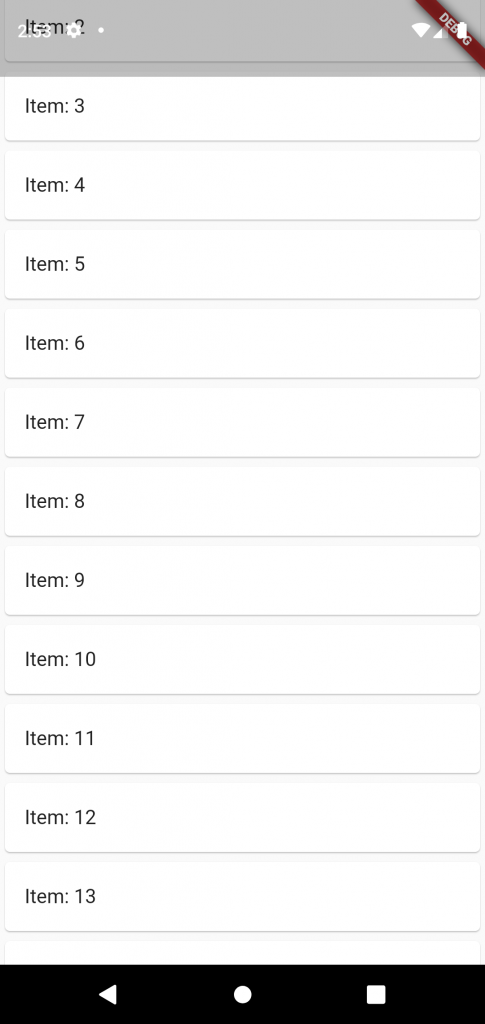
This week I would like to share about scrollbar widget and how to use it. Let’s go and start code!
By default scrollbar widget in flutter don’t show a scrollbar. But that’s fine in many cases but in others, you do want to display a scrollbar. Scrollbars show the users how far they’ve scrolled, and they allow things like jumping to a particular point in the list.
To show scrollbar use the widget called Scrollbar!
Make sure the scrollbar widget is finite. For example, it’s a ListView.builder, make sure itemCount is defined.
return MaterialApp(
      home: Scaffold(
        body: Center(
          child: Scrollbar(
            child: ListView.builder(
              itemCount: 20,
              itemBuilder: (context, index) {
                return Card(
                  child : ListTile(
                    title: Text("Item: ${index + 1}"),
                  )
                );
              }
            )
          ),
        )
      )
    );
Hoped you enjoyed this article!
By Ami
asahi at 2021年09月03日 10:00:13
 大人が楽しめるヒーリング絵本河童のカパと静かな森
 パワースポット 日本三大神滝布引の滝
 佐藤・広幸ドイツ魂
 Himeji Castle姫路城
 ボイドタイムお知らせアプリVoid Time 〜月を無視できない〜
 撮った写真をカレンダーに撮りカレ
 ライブ壁紙竹田城ライブ壁紙
 赤ちゃんにっこりBaby+Smile
 電子書籍[for iPhone]ターラのアストロロジー
 Vue.js コンパイルするときのポイント
 翻訳や文字起こしを視界の中へ――AIスマートグラス「INMO GO3」が国内発売