アプリ関連ニュース
- 2021年11月15日
- 技術情報
Database indexing
Database Indexing allows us to cut down the number of rows/records that need to be examined when a select query with a where clause is executed.
When a select query with a where clause is executed, every single row is checked to see if the query match the condition. This effectively means that the entire table will have to be scanned (known as the full table scan).
Without Indexing
An index is a data structure that stores the values for a certain specific column of a table and helps us avoid a full table scan. If the table is not indexed, the query will likely not recognize that the row order is optimized, so the query should search the rows linearly. That is, the query must search every row to find a row that matches the criteria. As you can imagine, this can take a long time. Examining every row is not very efficient.
This will take more and more time as the size of the table grows. With the sophistication of data, what can eventually happen is that a table with 1 billion rows is joined with another table with 1 billion rows. The query should spend twice as much time searching twice as many rows.
How can we imporve
If the database tables are in order, we can make search more efficiently without looking up all the records. For example, we are finding a user whose age is 18. If the age column is sorted , we can skip the records of age starting from 18.
In reality, the database table does not sort itself every time the query condition changes to optimize query performance. This is unrealistic. In reality, the index creates the data structure in the database. The data structure type is very likely to be a B-tree. There are many advantages of B-trees, but the main advantage of our purpose is that they are sortable and makes the search more efficiently.
How it works
Database indexes will also store pointers which are simply reference information for the location of the additional information in memory. So to be summarized, it creates a structure with the key of indexed column and the value of pointers which reference the actual database record. When a conditional query runs, it looks up the sorted index structure according to the data structure (B-Tree in this case), get the pointers and then go for the actual records.
Index cost
There is always something you need to give back if you want something. Index also requires additional memory. The more indexes you add, the more memory will be used. Don’t forget to index only the columns that are frequently queried. Otherwise, indexing each column consumes a huge amount of memory.
Secondly, the write operation will be a bit slower as it needs to create a index each time you add an entry to the table. A similar situation applies to updating or deleting data.
I think this will give you the abstraction knowledge of what database indexing looks like.
By Yuuma

yuuma at 2021年11月15日 10:00:00
- 2021年11月12日
- 技術情報
How to use Flutter font awesome icon ?
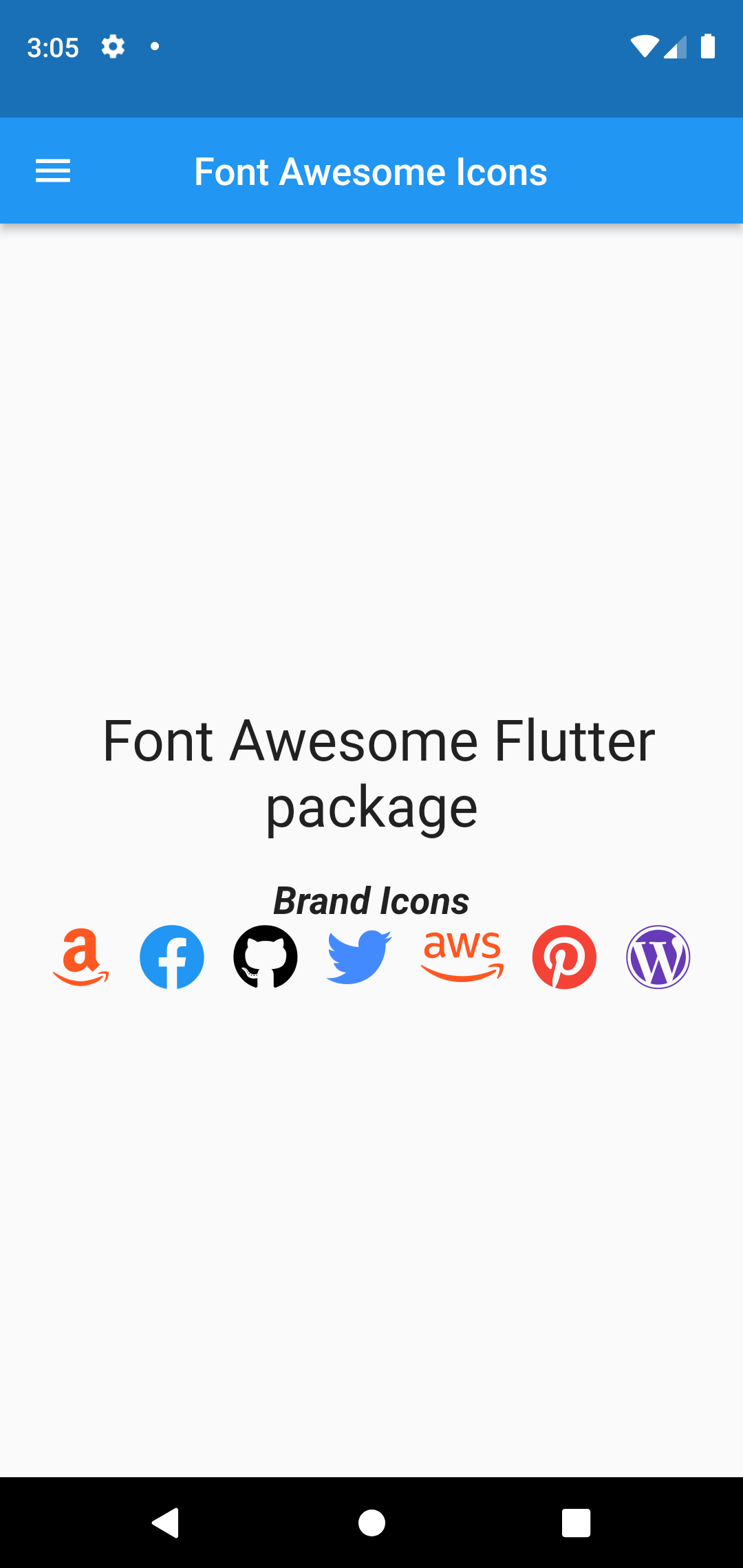
Need an icon not in Material?
The material design offers many helpful patterns, including a great set of icons. But they are not the only icons out there. Font awesome’s icon are truly, well, iconic. Luckily, with font_awesome_flutter package, including them in our flutter app.
It’s too simple so let’s build with simple app including flutter font awesome icon.
Firstly, we need to add font_awesome_flutter package in our pubspec.yaml file.
dependencies:
  font_awesome_flutter: ^9.2.0
For use font_awesome_flutter package, we will need to import this package .
import 'package:font_awesome_flutter/font_awesome_flutter.dart';To start the two components of Material Icons– wrapping with Icon and the inner icon_data value. Icons.menu is a default material icon. We will use this icon in our app.
Icon(Icons.menu)To change icon size and color:
Icon(FontAwesomeIcons.user,
    size: 50, //Icon Size
    color: Colors.white,
)
Use with FaIcon widget and let’s build a simple app then find out fond awesome icon usage!
return Scaffold(
      appBar: AppBar(
          centerTitle: true,
          leading: Icon(Icons.menu),
          title: const Text("Font Awesome Icons")
      ),
      body: Center(
        child: Column(
          mainAxisAlignment: MainAxisAlignment.center,
          children: [

            const Text(" Font Awesome Flutter package",textAlign:TextAlign.center,style: TextStyle(fontSize: 30),),
            const SizedBox(height: 20,),
            //brand Icons
            const Text("Brand Icons",textAlign: TextAlign.start,style: TextStyle(fontWeight: FontWeight.bold,fontStyle:FontStyle.italic,fontSize: 20),),
            Row(
              mainAxisAlignment: MainAxisAlignment.center,
              children: const [
                FaIcon(FontAwesomeIcons.amazon,color: Colors.deepOrange,size: 35,),
                SizedBox(width: 15,),
                FaIcon(FontAwesomeIcons.facebook,color: Colors.blue,size: 35,),
                SizedBox(width: 15,),
                FaIcon(FontAwesomeIcons.github,color: Colors.black,size: 35,),
                SizedBox(width: 15,),
                FaIcon(FontAwesomeIcons.twitter,color: Colors.blueAccent,size: 35,),
                SizedBox(width: 15,),
                FaIcon(FontAwesomeIcons.aws,color: Colors.deepOrange,size: 35,),
                SizedBox(width: 15,),
                FaIcon(FontAwesomeIcons.pinterest,color: Colors.red,size: 35,),
                SizedBox(width: 15,),
                FaIcon(FontAwesomeIcons.wordpress,color: Colors.deepPurple,size: 35,),
              ],
            ),
          ],
        ),
      ),
    );
Hope you enjoy flutter new things!
By Ami
asahi at 2021年11月12日 10:00:00
- 2021年11月11日
- Web Service
APIs vs. Webhooks
An API (Application Programming Interface) enables two-way communication between software applications driven by requests. A webhook is a lightweight API that powers one-way data sharing triggered by events. Together, they enable applications to share data and functionality, and turn the web into something greater than the sum of its parts.
What is an API?
An API is like a portal through which information and functionality can be shared between two software services. The word “interface” is key to understanding an API’s purpose. Just like a web browser is an interface for a human end user to receive, send, and update information on a web server, an API is an interface that provides software programs with the same functionality.
What is a webhook?
A webhook can be thought of as a type of API that is driven by events rather than requests. Instead of one application making a request to another to receive a response, a webhook is a service that allows one program to send data to another as soon as a particular event takes place. Webhooks are sometimes referred to as “reverse APIs,” because communication is initiated by the application sending the data rather than the one receiving it. With web services becoming increasingly interconnected, webhooks are seeing more action as a lightweight solution for enabling real-time notifications and data updates without the need to develop a full-scale API.
Next week, I will continue to share the usage of webhook in Laravel.
By tsuki
tsuki at 2021年11月11日 10:00:00
- 2021年11月10日
- Windows
Windows11 SE 発表
tanaka at 2021年11月10日 10:58:00
- 2021年11月09日
- 技術情報
Differences between PHP and Nodejs
Today, I would like to share about differences between PHP and Nodejs for backend. Obviously, They have their own properties on particular aspects. The following are their comparisons.
Concurrency: Synchronous vs. Asynchronous
PHP is synchronous by nature, so it executes code line by line. When PHP code is executed, it waits for the current line to finish execution before it moves to the next line, and thus, it blocks the request.
Node.js is asynchronous by nature, so code doesn’t wait for I/O operations to complete their execution. For handling slow operations like I/O or remote data fetching, Node uses callbacks, promises, or JavaScript’s built-in and keywords. This makes Node.js pretty fast and makes it easy for a Node server to handle a high number of connections.
Runtime Environment: Zend Engine vs. V8 JavaScript Engine
PHP runs on the Zend engine, which is an open-source scripting engine which interprets the PHP code.
Node.js is an open-source, cross-platform, back-end JavaScript runtime environment that runs on Google’s V8 JavaScript engine.
Package Manager: Composer vs. NPM
Package management is one of the gray areas in PHP and has been a topic for debate over the years. There has never been a standard package manager which PHP developers could use to install reusable PHP libraries and components. PEAR was a widely-used package manager for PHP, but can now be thought to be deprecated. However, with initiatives like PHP-FIG and Composer, the PHP community has finally got a reliable system. Composer can be considered the standard package manager for PHP.
On the other hand, Node.js already provides NPM (Node Package Manager), a package management system. It is easy to use NPM to manage Node packages in your application. In fact, NPM has become the de facto standard for sharing reusable JavaScript components.
Performance
Node.js is asynchronous by nature, and thus, it has superior performance on tasks with a lot of connections or a lot of time-consuming I/O or network operations. However, it’s important to note that Node.js is single-threaded by default, so a CPU-intensive operation in one request will block all connections to the server until it is complete.
By Asahi
waithaw at 2021年11月09日 10:00:00
 大人が楽しめるヒーリング絵本河童のカパと静かな森
 パワースポット 日本三大神滝布引の滝
 佐藤・広幸ドイツ魂
 Himeji Castle姫路城
 ボイドタイムお知らせアプリVoid Time 〜月を無視できない〜
 撮った写真をカレンダーに撮りカレ
 ライブ壁紙竹田城ライブ壁紙
 赤ちゃんにっこりBaby+Smile
 電子書籍[for iPhone]ターラのアストロロジー
 Vue.js コンパイルするときのポイント
 翻訳や文字起こしを視界の中へ――AIスマートグラス「INMO GO3」が国内発売