アプリ関連ニュース
- 2021年5月13日
- 技術情報
DB管理をAdminerでおこなう

nishida at 2021年05月13日 10:00:22
- 2021年5月12日
- 他の話題
個人用ファイルサーバー機の作成(HDDの組み込み)
tanaka at 2021年05月12日 10:00:04
- 2021年5月10日
- 技術情報
Basic Auth by PHP
There are several ways to add a basic authentication using php. Today I would like to share a snippet to add basic authentication easily.
Lets get started.
<?php

//you can define your custom username and password here.
$AUTH_USER = 'username';
$AUTH_PASS = 'password';

header('Cache-Control: no-cache, must-revalidate, max-age=0');
$credentials = !(empty($_SERVER['PHP_AUTH_USER']) && empty($_SERVER['PHP_AUTH_PW']));

//check credentials existence or wrong credentials
$auth_fail = (
	!$credentials ||
	$_SERVER['PHP_AUTH_USER'] != $AUTH_USER ||
	$_SERVER['PHP_AUTH_PW']   != $AUTH_PASS
);

//Ask for the auth. If credentials are not correct, deny the access.
if ($auth_fail) {
	header('HTTP/1.1 401 Authorization Required');
	header('WWW-Authenticate: Basic realm="Access denied"');
	exit;
}
After the coding process, you will get a confirmation alert box for authentication before accessing the website as below.
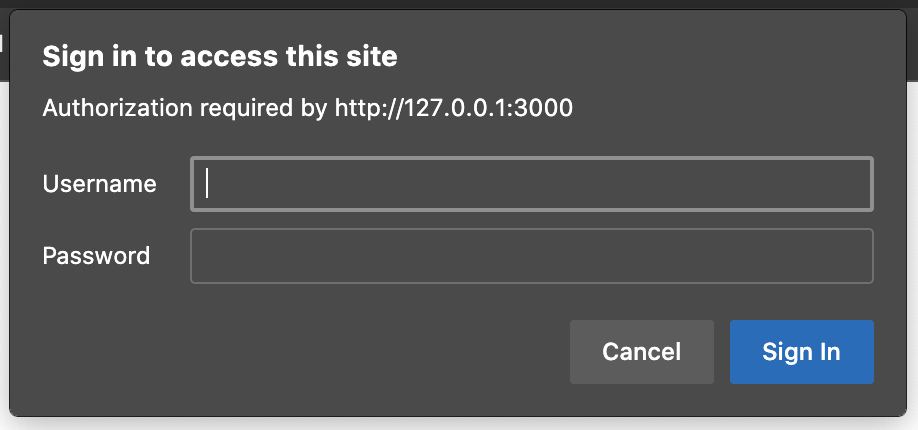
Well, I think you can now add basic auth in any of your PHP application neat and easily.
If you want to add basic authentication for contents like html and images etc , you can also do that by configuring .htaccess
Yuuma
yuuma at 2021年05月10日 11:00:09
- 2021年5月07日
- 技術情報
Visual Studio Code for PHP developers
Makes it clean and pretty code each time you open VS Code to help us all become better engineers! I want to share some important VS Code tips and tricks.
Quickly open files
Keyboard Shortcut: Ctrl+P
Access all available commands.
Keyboard Shortcut: Ctrl+Shit+P
Navigate between recently opened folders and workspace
Keyboard Shortcut: Ctrl+R
There are many things you can do to customize your code format.
- Change your theme
Firstly Keyword Shortcut: Ctrl+Shit+P then go to type >theme and select your preference theme.
If you want to add color theme, I recommend Gruvbox Material. It’s totally pretty color theme that I’ve used.
Customize your keyboard shortcuts
Keyboard Shortcut: Ctrl+K Ctrl+S
Search and Install extensions
Keyboard Shortcuts : Ctrl+Shift+X
You can find extensions in the VS Code Marketpalce.
Integrated Terminal
Keyboard Shortcut: Ctrl+`
Toggle SideBar
Keyboard Shordcut: Ctrl+B
Toggle Panel
Keyboard Shordcut: Ctrl+J
Zen mode
Keyboard Shortcut: Ctrl+K Z
Press Esc twice to exit Zen mode.
Move to Explorer window
Keyboard Shortcut: Ctrl+Shit +E
Navigation entire history
Keyboard Shordcut: Ctrl+Tab
Multi Cursor selection
Keyboard Shortcut: Ctrl+Shit+Left
To set cursors above or below the current position use
Keyboard Shortcut: Ctrl+Alt+Up or Ctrl+Alt+Down
Copy line up / down
Keyboard Shortcut: Shift+Alt+Up or Shift+Alt+Down
Code Formatting
Whole document format: Shift+Alt+F
Code Folding
Keyboard Shortcut: Ctrl+Shift+[ or Ctrl+Shift+]
Select Current Line
Keyboard Shortcut: Ctrl+L
Navigate to beginning and end of file
Keyboard Shortcut: Ctrl+Home and Ctrl+End
Move line up and down
Keyboard Shortcut: Alt+Up or Alt+Down
Git integration
Keyboard Shortcut: Ctrl+Shift+G
You can install other SCM providers from the Extension Marketplace. Most of the time I’m preferred GitLens extension. It’s incredible useful.
Diffs
From the Source Control view, select a file to open the diff.
Views
The default view for diffs is the side by side view.
Toggle inline view by clicking the More Actions (…) button in the top right and selecting Toggle Inline View.
Branches
Easily switch between Git branches via the Status Bar.
Staging
Hover over the number of files and click the plus button.
Click the minus button to unstage changes.
Undo Last Commit
Click the (…) button and then select Undo Last Commit to undo the previous commit. The changes are added to the Staged Changes section.
See Git output
VS Code makes it easy to see what Git commands are actually running. This is helpful when learning Git or debugging a difficult source control issue
Use the Toggle Output command (Ctrl+Shift+U) and select Git in the dropdown.
By Ami
asahi at 2021年05月07日 10:00:42
- 2021年4月28日
- 他の話題
仮想通貨によってハードディスクも枯渇しだしました
tanaka at 2021年04月28日 10:00:35
 大人が楽しめるヒーリング絵本河童のカパと静かな森
 パワースポット 日本三大神滝布引の滝
 佐藤・広幸ドイツ魂
 Himeji Castle姫路城
 ボイドタイムお知らせアプリVoid Time 〜月を無視できない〜
 撮った写真をカレンダーに撮りカレ
 ライブ壁紙竹田城ライブ壁紙
 赤ちゃんにっこりBaby+Smile
 電子書籍[for iPhone]ターラのアストロロジー
 Vue.js コンパイルするときのポイント
 翻訳や文字起こしを視界の中へ――AIスマートグラス「INMO GO3」が国内発売