アプリ関連ニュース
- 2021年4月15日
- VR
OCULUS AIR LINKが発表されました

nishida at 2021年04月15日 10:00:11
- 2021年4月12日
- Mac
Unrar for macOS
Today I will talk about unrar for the people who are using macOS , can’t open rar file as default. For the zip file , we don’t need extra installable libraries or something as the system includes by default.
Recently, we can install unrar through brew like this.
brew install unrarUnfortunately unrar has been removed from homebrew core because of licensing issues.
But don’t worry if you are looking for an alternatives, there is a library called carlocab/personal/unrar and you can install like this.
brew install carlocab/personal/unrarAfter installation, we can call unrar in your terminal and it will look like this
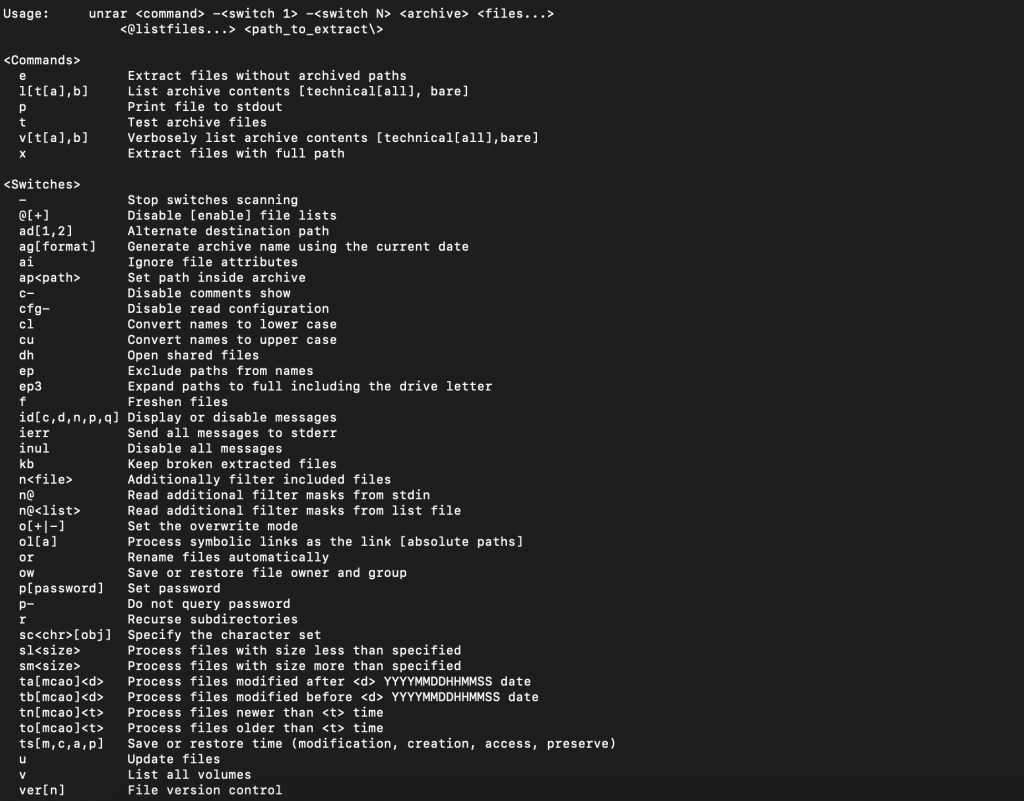
and we can simply start using like this.
unrar x filename.rarActually, there are other formulae on homebrew-core that also extract various forms of compressed files. Depending on the formats you are working with, you may find that there is already an existing homebrew-core formula that suits your needs.
I will also add a link for your further reference here.
Thanks for reading.
Yuuma
yuuma at 2021年04月12日 11:00:11
- 2021年4月09日
- 技術情報
Prohibited Validation Rules in Laravel
Sometimes we wish to forcefully prevent some of the fields in the request.
Now we just got that. Laravel 8 has three validation added for prohibited fields. Let’s walk through a few examples of where the prohibited validation rules might be useful and look at each one in more detail.
Prohibited Validation Rule
The “prohibited” rule checks if the field under validation must be empty or not present or throw an error otherwise.
// PUT /api/licenses/123-456

// {"name":"hello-world", "key":"random-key"}

$validated = $request->validate([
    'name' => 'required|max:255',
    'key' => 'prohibited',
]);

// Response: 422

// The key field is prohibited
The above is where a user might expect to update an API key by sending a PUT request to a resource. That field is likely ignored during the request. However, a successful response might lead to the user to believe they were able to update the key when in reality, the API ignored it.
If prohibited validation rule registers, the key field is present in the request it will terminate the request with 422 HTTP code response code and throw the error with the message The key field is prohibited.
Prohibited If and Unless Rules
The “prohibited_if ” rule checks if the field under validation must be empty or not present if the another field is equal to any value.
Validator::validate([
‘is_minor’ => true,
‘tos_accepted’ => true
], [
‘tos_accepted’ => ‘prohibited_if:is_minor, true’
]);
The above example is we’re expecting tos_accepted field will be forbidden if is_minor filed accepts true value. This example means someone accepting terms of service that has identified as a minor. Perhaps the application requires a parental registration to consent on their behalf.
The basic idea of “Prohibited_unless” rule is that a given filed should be prohibited from having data unless another field is equal to any value.
Validator::validate([
‘is_deceased’ => false,
‘date_of_death’ => ‘2021-03-09’
], [
‘date_of_death’ => ‘prohibited_unless:is_deceased,true’
]);
The above example might be initially the is_deceased filed set to false value.If we’re expecting the date_of_death field not to be forbidden, the is_deceased’ field set to true value.The example illustrates perfectly how to use this rule to explicitly prevent contradictory input.
By Ami
asahi at 2021年04月09日 10:00:12
- 2021年4月08日
- Unity
[Unity] 3D Textの使用方法
今回はUnityの3D Objectの「3D Text」の使用方法をシェアします。
「3D Text」を使用すると、オブジェクトにテキストを配置したり、
テキスト内容や表示色等を動的に更新することができます。
nishida at 2021年04月08日 10:00:02
- 2021年4月07日
- Windows
Windows用アプリケーションのメニューバーの項目の増やし方
tanaka at 2021年04月07日 10:00:40
 大人が楽しめるヒーリング絵本河童のカパと静かな森
 パワースポット 日本三大神滝布引の滝
 佐藤・広幸ドイツ魂
 Himeji Castle姫路城
 ボイドタイムお知らせアプリVoid Time 〜月を無視できない〜
 撮った写真をカレンダーに撮りカレ
 ライブ壁紙竹田城ライブ壁紙
 赤ちゃんにっこりBaby+Smile
 電子書籍[for iPhone]ターラのアストロロジー
 Vue.js コンパイルするときのポイント
 翻訳や文字起こしを視界の中へ――AIスマートグラス「INMO GO3」が国内発売