Web Service
- 2022年01月13日
- Web Service
ES9 Features
EcmaScript is the “official” name for JavaScript. It was eventually abandoned and ES3.1 became ES5, which is the JavaScript version used in the “HTML5” world. ECMAScript is the “standard for” the JavaScript language.
ECMAScript2018 or ES9 has been evolving for the last few years and it has improved a lot.
The top features of the ES9 are
1.Object Rest/Spread Properties
If you want to extract an object excluding one or more properties, you can do it in ES9. It was not possible in the previous versions.
Here is an example:
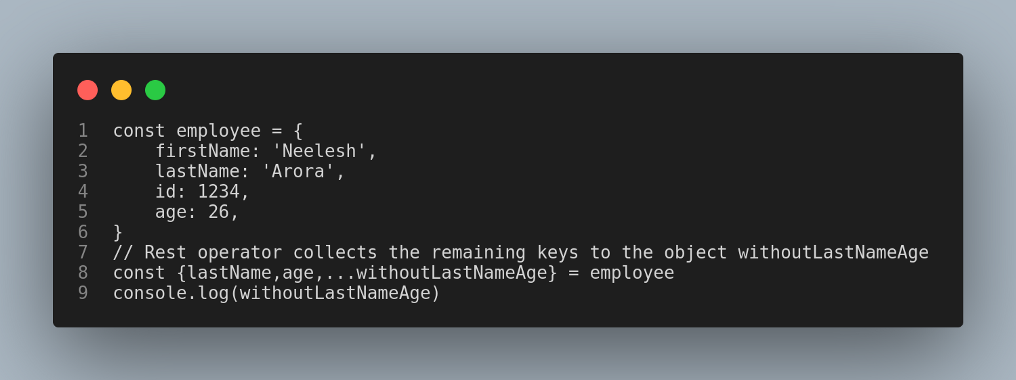
Output is

2.Regular Expressions (RegExp) named Groups
A capture group can be given a name using the (?<name>...) syntax. The groups can be accessed via the ‘groups’ property of the regular expression’s result. Numbered references to groups are also created as usual.
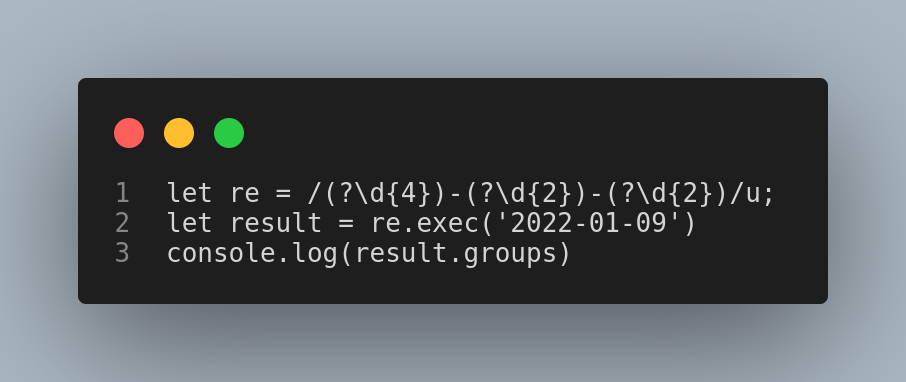
Output is :

3.Asynchronous Iterators
ES9 introduces the AsyncIterator interface, an asynchronous iteration statement (for — await — of), and async generator functions. The for — await — of statement creates a loop iterating over async iterable objects as well as on sync iterables. The loop can only be used in an async function.
Syntax:
for await (const variable of iterable) {
statement
}
4. Promise.prototype.finally
Promises now include a ‘finally’ method. You can use this when you want to perform an action irrespective of the promise being fulfilled or rejected. A good example of this would be turning off a loader after an API call is completed.
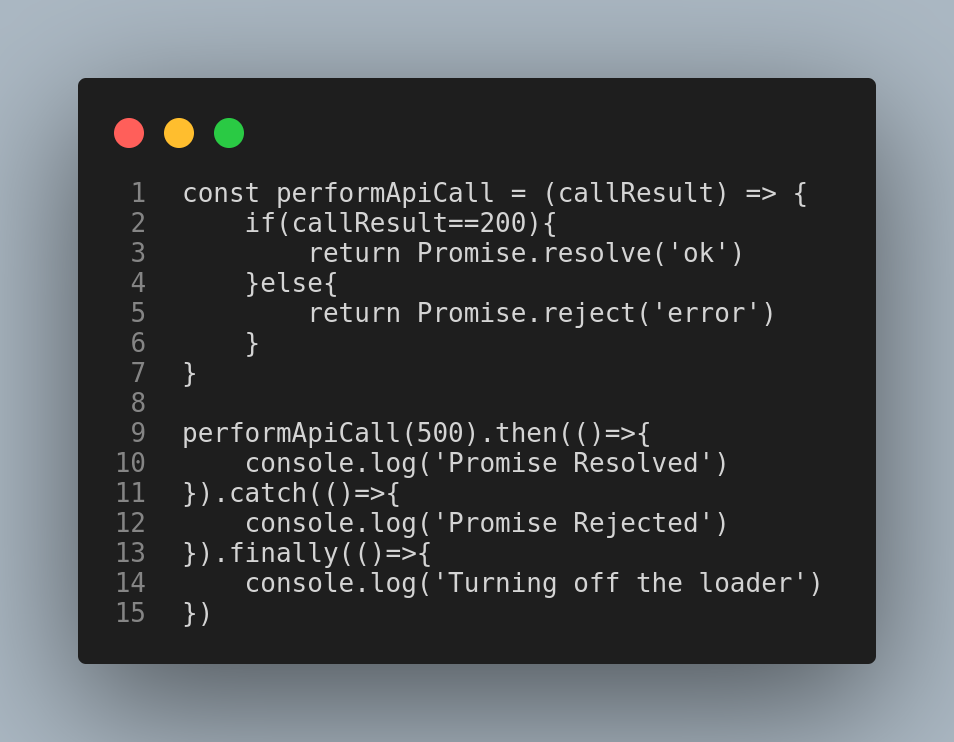

Output when 200 is passed.

Output when 500 is passed.
These were the features of ES9 that will definitely help to code in a better way.
Tsuki

tsuki at 2022年01月13日 10:00:00
- 2021年12月21日
- 技術情報, Web Service
PHP Zipper package using PHP ZipArchive
Today I would like to share a PHP package that I wrote last weekend. This was written to make Zipping processes easily and automatically using PHP ZipArchive. Let’s take a look.
First of all, install the package with composer.
composer require waithaw/phpzipperAfter creating Zip Object, you can use the following methods.
include_once "vendor/autoload.php";

use WaiThaw\PhpZipper\Zip;

$zip = new Zip();
These are the example file lists.
$filelists= [
    'D:\testfolder\test1.txt',
    'D:\testfolder\test1folder\test2.txt'
];

$file = 'D:\testfolder\test1.txt';
Creating a Zip file from Single file or multiple files
You can create an archive zip file from single file or multiple files.
1st parameter – output zip path
2nd parameter – a file or files to be zipped
3rd parameter – setting a password
- Zipping a single file or mutiple files with no password
$zip->createFromFiles('backup.zip', $file);

//OR

$zip->createFromFiles('backup.zip', $filelists);
- Zipping a single file or mutiple files with password
$zip->createFromFiles('backup.zip', $file ,'password');

//OR

$zip->createFromFiles('backup.zip', $filelists,'password');
Creating a Zip file from a directory including sub directories.
You can archive all files and subfolders in a directory into a zip file.
- Zipping a directory with no password
$zip->createFromDir('backup.zip','D:\testfolder');- Zipping a directory with password
$zip->createFromDir('backup.zip','D:\testfolder','password');Extracting a simple or password-protected zip file
- Extracting a simple zip file.
$zip->extractTo('backup.zip','D:\outputpath');- Extracting a password-protected zip file
$zip->extractTo('backup.zip','D:\outputpath', 'password');Downloading zip files
You can download the zip file at once archiving.
$zip->createFromFiles('backup.zip', $file)->download();

$zip>createFromDir('backup.zip','D:\testfolder')->download();
And you can also delete the zip file after downloaded, by passing ‘delete’ string in download() method.
$zip->createFromFiles('backup.zip', $file)->download('delete');

$zip>createFromDir('backup.zip','D:\testfolder')->download('delete');
This is all for now. I will continue to update this package for more features and details.
Hope you enjoy that.
By Asahi
waithaw at 2021年12月21日 10:00:00
- 2021年12月16日
- Web Service
Tips & best practices for Laravel 8
This article will show you the mysterious tricks that might help you when writing code with Laravel.
1.Use local scopes when you need to query things
Laravel has a nice way to write queries for your database driver using Query Builder. Something like this:
$orders = Order::where(‘status’, ‘delivered’)->where(‘paid’, true)->get();
This is pretty nice.But this bit of code can be better written if we use local scopes.
Local scopes allow us to create our Query Builder methods we can chain when we try to retrieve data. For example, instead of ->where() statements, we can use ->delivered() and ->paid() in a cleaner way.
First, in our Order model, we should add some methods:
class Order extends Model
{
   ...
   public function scopeDelivered($query) {
      return $query->where('status', 'delivered');
   }   public function scopePaid($query) {
      return $query->where('paid', true);
   }
}
When declaring local scopes, you should use the scope[Something] exact naming. In this way, Laravel will know that this is a scope and will make use of it in your Query Builder. Make sure you include the first argument that is automatically injected by Laravel and is the query builder instance.
$orders = Order::delivered()->paid()->get();
For more dynamic retrieval, you can use dynamic local scopes. Each scope allows you to give parameters.
class Order extends Model
{
   ...
   public function scopeStatus($query, string $status) {
      return $query->where('status', $status);
   }
}$orders = Order::status('delivered')->paid()->get();
Laravel uses by default where[Something] to replace the previous scope. So instead of the previous one, you can do:
Order::whereStatus(‘delivered’)->paid()->get();
Laravel will search for the snake_case version of Something from where[Something]. If you have status in your DB, you will use the previous example. If you have shipping_status, you can use:
Order::whereShippingStatus(‘delivered’)->paid()->get();
2.Magic scopes
When building things, you can use the magic scopes that are already embedded
- Retrieve the results by
created_at, descending:
User::latest()->get();
- Retrieve the results by any field, descending:
User::latest('last_login_at')->get();
- Retrieve results in random order:
User::inRandomOrder()->get();
- Run a query method only if something’s true:
3.Do not store model-related static data in configs
Instead of this:
BettingOdds.php
class BettingOdds extends Model
{
   ...
}

config/bettingOdds.php

return [
   'sports' => [
      'soccer' => 'sport:1',
      'tennis' => 'sport:2',
      'basketball' => 'sport:3',
      ...
   ],
];
And accessing them using:
config(’bettingOdds.sports.soccer’);
I prefer doing this:
BettingOdds.php
class BettingOdds extends Model
{
   protected static $sports = [
      'soccer' => 'sport:1',
      'tennis' => 'sport:2',
      'basketball' => 'sport:3',
      ...
   ];
}
And access them using:
BettingOdds::$sports['soccer'];
Because it’s easier to be used in further operations:
class BettingOdds extends Model
{
   protected static $sports = [
      'soccer' => 'sport:1',
      'tennis' => 'sport:2',
      'basketball' => 'sport:3',
      ...
   ];public function scopeSport($query, string $sport)
   {
      if (! isset(self::$sports[$sport])) {
         return $query;
      }

      return $query->where('sport_id', self::$sports[$sport]);
   }
}
Now we can enjoy scopes:
BettingOdds::sport('soccer')->get();
4.Use collections instead of raw-array processing
Back in the days, we were used to working with arrays in a raw way:
$fruits = ['apple', 'pear', 'banana', 'strawberry'];foreach ($fruits as $fruit) {
   echo 'I have '. $fruit;
}
Now, we can use advanced methods that will help us process the data within arrays. We can filter, transform, iterate and modify data inside an array:
$fruits = collect($fruits);$fruits = $fruits->reject(function ($fruit) {
   return $fruit === 'apple';
})->toArray();['pear', 'banana', 'strawberry']
Tsuki
tsuki at 2021年12月16日 10:00:00
- 2021年12月16日
- 技術情報, Web Service, スマホ
JavaScriptでQRコードをスキャンする
今回はJavaScriptでQRコードをスキャンするライブラリcozmo/jsQR(https://github.com/cozmo/jsQR)を紹介します。
前回の記事「PHP QRコード生成ライブラリ「endroid/qr-code」」ではQRコードの生成方法を紹介しましたが、今回は生成したQRコードをスマートフォンやPCのWebカメラを使用してJavaScriptでスキャンする方法を紹介いたします。
続きを読むnishida at 2021年12月16日 10:00:00
- 2021年12月09日
- Web Service
Different Laravel methods firstOrNew, firstOrCreate, firstOr, and updateOrCreate
Standard methods for creating Eloquent Models like make(), create(), update, and save(). Laravel includes some other methods are that also really useful for creating and updating Models that I feel don’t get enough attention. So in this article, I’d like to go over some of these additional methods and explain how they might be useful.
1. firstOrNew
The firstOrNew method is really useful for finding the first Model that matches some constraints or making a new one if there isn’t one that matches those constraints.
You can take a piece of code that looks like this:
$user = User::where(‘email,’$request->email)->first();
if($user === null){
$user = new User([ ‘email’ => $request->email ]);
$user->name = $request->name;
$user->save();
}
And turn it into this:
$user = User::firstOrNew( [ ‘email’ => $request->email ] );
$user->name = $request->name;
$user->save();
You may also pass an array of additional attributes to set as the second parameter if no existing Model is found:
$user = User::firstOrNew([‘email’ => request(‘email’)],[‘name’ => request(‘name’)]);
$user->save();
2.firstOrCreate
I recently found the firstOr method while source-diving. The firstOr method retrieves the first Model from a query, or if no matching Model is found, it will call a callback passed. This can be really useful if you need to perform extra steps when creating a user or want to do something other than creating a new user:
$user = User::where(‘email,’$request->email)->firstOr(function(){
$account = Account::create([
return User::create([
‘account_id’ => $account->id,
‘email’ => $request->email
]);
]);
});
3.firstOr
I recently found the firstOr method while source-diving. The firstOr method retrieves the first Model from a query, or if no matching Model is found, it will call a callback passed. This can be really useful if you need to perform extra steps when creating a user or want to do something other than creating a new user:
$user = User::where(‘email,’$request->email)->firstOr(function(){
$account = Account::create([
return User::create([
‘account_id’ => $account->id,
‘email’ => $request->email
]);
]);
});
4.updateOrCreate
The updateOrCreate method attempts to find a Model matching the constraints passed as the first parameter. If a matching Model is found, it will update the match with the attributes passed as the second parameter. If no matching Model is found a new Model will be created with both the constraints passed as the first parameter and the attributes passed as the second parameter.
You can refactor this piece of code:
$user = User::where(‘email,’$request->email)->first();
if($user !== null){
$user->update([‘name’ => $request->name]);
}else{
$user = User::create([
‘email’ => $request->email,
‘name’ => $request->name
]);
}
To this using the updateOrCreate method:
$user = User::updateOrCreate([
‘email’ => $request->email,
‘name’ => $request->name
]);
Tsuki
tsuki at 2021年12月09日 10:00:00
 大人が楽しめるヒーリング絵本河童のカパと静かな森
 パワースポット 日本三大神滝布引の滝
 佐藤・広幸ドイツ魂
 Himeji Castle姫路城
 ボイドタイムお知らせアプリVoid Time 〜月を無視できない〜
 撮った写真をカレンダーに撮りカレ
 ライブ壁紙竹田城ライブ壁紙
 赤ちゃんにっこりBaby+Smile
 電子書籍[for iPhone]ターラのアストロロジー
 Vue.js コンパイルするときのポイント
 翻訳や文字起こしを視界の中へ――AIスマートグラス「INMO GO3」が国内発売