技術情報
- 2021年08月27日
- 技術情報
Switch List Tile in flutter
Take a moment to think back to the last time you looked at the settings page. If you wish you would quickly and easily create a list of toggle switches like that, just use SwitchListTile.
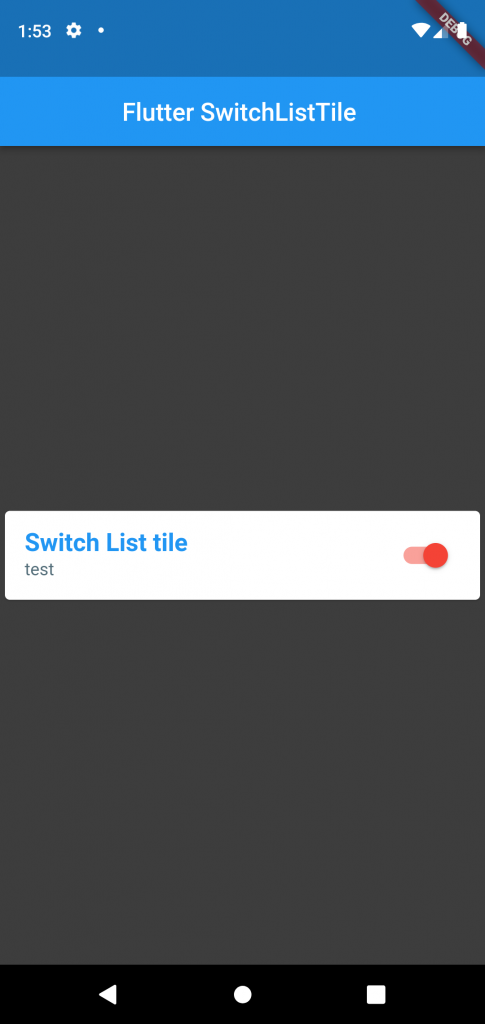
Switch List Tile, you get a little tile that’s tappable anywhere to switch a toggle from off to on.
SwitchListTitles API looks a lot like widgets of similar names. ListTile, CheckboxListTile, RadioListTile, SwitchListTile all follow the same pattern.
ListTile(
 title: Text("List Tile"),
),
SwitchListTile(
 title: Text("Switch List Tile"),
/*.....*/
),
Start with the title : Text, which will appear in the middle of the tile. Then you can add Icons to either end, and with the control tiles like SwitchListTile.
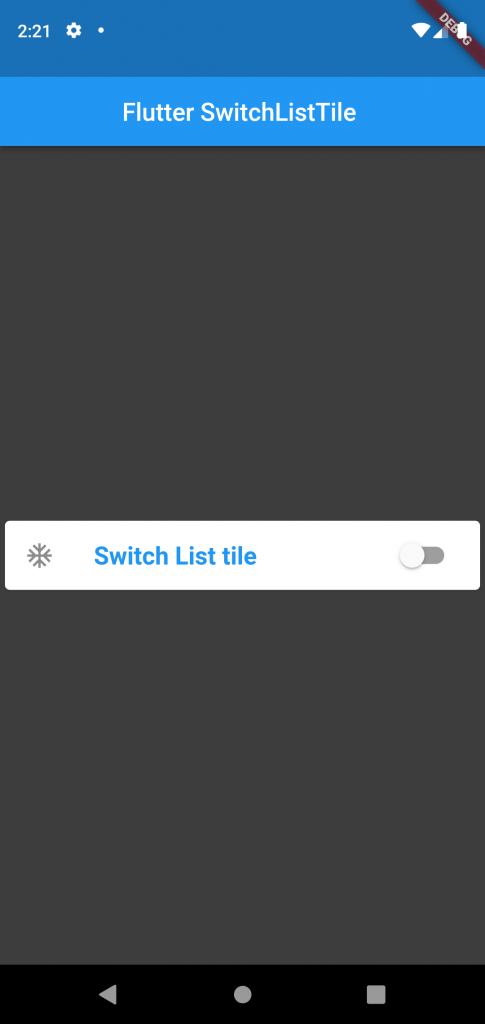
ListTile(
 title: Text("List Tile"),
 leading: Icon(Icons.ac_unit),
 trailing: Fire(),
),
SwitchListTile(
 title: Text("Switch List Tile"),
 secondary: Icon(Icons.ac_unit),

),
Hope you enjoyed this article!
By Ami

kishimoto at 2021年08月27日 10:00:52
- 2021年08月23日
- 技術情報
Codespaces
We might heard about the news of codespace from github recently. If you don’t , it’s ok. I will briefly introduce about codespace today.
GitHub has announced its product, Codespaces recently for its daily development flow. Codespaces provides a full-featured cloud-hosted development environment that can be very useful for day to day development or short interval period development for overall cases. Codespaces now supports Emacs, Vim and Visual Studio Code as code editors.
After Microsoft bought Github, I knew this is probably coming as a service and here it is. They said
Local development environments are fragile. And even when functioning perfectly, a single-context, bespoke local development environment felt increasingly out of step with the instant-on, access-from-anywhere world in which we now operate.
The Codespaces can run directly within GitHub, so developers can start contributing to their projects almost instantly.
According to GitHub, The target of Codespaces not only fixed the issue of vulnerabilities in the local environment, but also provided additional opportunities to improve the development experience. Much effort to run in a single developer local environment. Similarly, developer machines can be upgraded to higher specs very easily.
You can see the official announcement blog here and don’t forget to try it out as it’s exciting to do a development not at locally as we usually do, this time is at cloud.
Yuuma.
kishimoto at 2021年08月23日 10:30:09
- 2021年08月20日
- 技術情報
Flutter – Physical Model
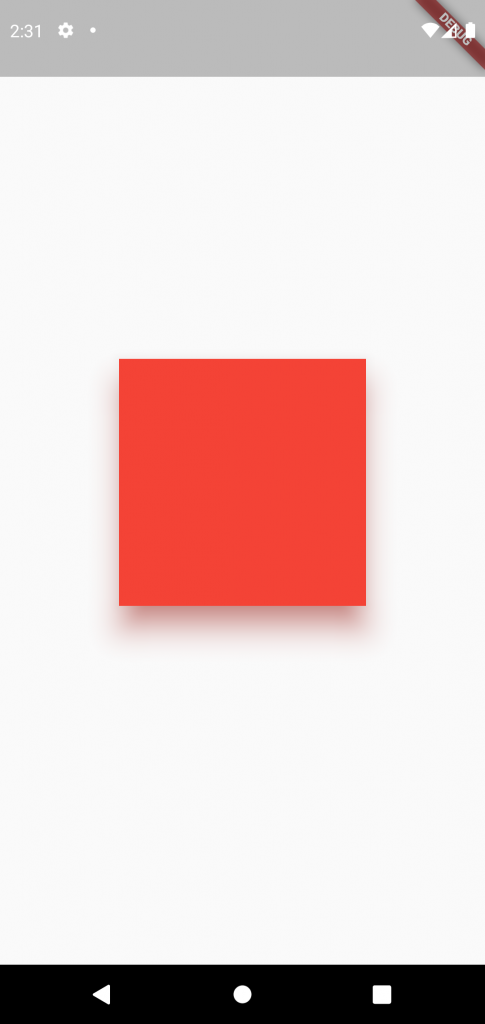
All of the best app start with a square, squarely in the middle of the screen. But to turn this abstract idea into something more real we need to think outside the box.
All of the best app start with a square, squarely in the middle of the screen. But to turn this abstract idea into something more real we need to think outside the box.
If you look at the real physical box the only way you’re able to see it with some light, and that light casts a shadow. What if we want our abstract boxes to have a real shadow? Just like a real box. So that our users have a mental model for what the things in your app are.
Well, that’s what a Physical Model is for. Just take whatever widget you’re working with, wrap it inside of a Physical Model and give it a color.
PhysicalModel(
  child: BlueBox(),
  color: Colors.black,
)
Wait! There is no shadow. By default Physical Model’s elevation is zero, so we need to pick that box up to be able to see the shadow.
PhysicalModel(
  child: BlueBox(),
  color: Colors.black,
  elevation:  8.0
)
But unlike the real world we have additional options, for our Physical model’s shadows, like it’s color.
PhysicalModel(
  child: BlueBox(),
  color: Colors.black,
  shadowColor: Colors.pink,
  elevation:  8.0,
)
You can also change the roundness of the shadow’s corners.
PhysicalModel(
  child: BlueBox(),
  color: Colors.black,
  shadowColor: Colors.pink,
  elevation:  8.0,
  borderRadius:
   BorderRadius: circular(45),
)
or simply update what shape it takes.
PhysicalModel(
  child: BlueBox(),
  color: Colors.black,
  shadowColor: Colors.pink,
  elevation:  8.0,
  shape: BoxShape.circle,
)
Physical Model is super useful, when you have ideas for custom shadow effects, it’s also used under the hood in widgets like Material to build material shadow.
Let’s create simple Physical model!! The result screenshoot is at the top.
    return Scaffold(
      body: Center(
        child: PhysicalModel(
          elevation: 20.0,
          shadowColor: Colors.red,
          color: Colors.red,
          child: Container(
            width: 200,
            height: 200,
            decoration: BoxDecoration(
              shape: BoxShape.circle,
              border: Border.all(
                color: Colors.red,
                width: 1.0,
              ),
            ),
          ),
        ),
      ),
    );
Hope you enjoyed this post!
By Ami
kishimoto at 2021年08月20日 10:00:32
- 2021年08月09日
- 技術情報
Git tricks you should know
We use version control system to manage and gather our source codes, right. I am pretty sure most of us are using Git for version control system nowadays. Today, I will share with you some git commands that will help you to improve your git knowledge.
Remove all your local git branches except master
You may have many local branches while you are on developments. But one day, you may want to get rid of these local branches and keep only main/master branch. This command will help you.
git branch | grep -v "main" | xargs git branch -DUndo last commit
If you want to undo your most recent commit. Follow these steps.
git commit -m "undo message"Then reset our changes
Pretty git log format
git reset HEAD~Normally we use to see our git log activity using git log. But we can see better with pretty formatting using this.
git log --graph --abbrev-commit --decorate --format=format:'%C(bold blue)%h%C(reset) - %C(bold green)(%ar)%C(reset) %C(white)%s%C(reset) %C(dim white)- %an%C(reset)%C(bold yellow)%d%C(reset)' --allDeleting git branch
I wrote deleting local branches except main/master in above. In here, I will talk about deleting a specific branch both on local and remote.
Deleting on local
git branch -d <branch_name>Deleting on remote
git push <remote> --delete <branch_name>Cherry picking from another repository
We can apply the changes from another repository to us also.
git fetch <remote-url> <branch_name> && git cherry-pick SHA1I’m pretty sure there are other useful tricks as well. That’s all for now.
Yuuma
kishimoto at 2021年08月09日 10:30:19
- 2021年08月02日
- 技術情報
Getting Hostname in Laravel
We have to catch your domain name, hostname and url segments and use it back in your projects frequently. Today I will share a few functions to get it done easily in Laravel Framework.
getHttpHost
request()->getHttpHost(); //return domain.comThis will return the domain name like this.
request()->getHost(); // return domain.comThis also works same with above method.
getSchemeAndHttpHost
If you want to get http segments along with the domain name. You can use getSchemeAndHttpHost method.
request()->getSchemeAndHttpHost(); // return https://domain.comurl
Using the url method, you can get the current route path like this.
url()->current(); // return current existing urlYou can also use request()->url() to return the url address along with http.
segment
If you need to parse your routing url , the segment will help to parse it. For example this is our current url domain.com/blog/hello
request()->segment(0); // return blog
request()->segment(1); // return hello
The methods I wrote above are some of the useful functions if you have to deal with your URL address or hostname.
Yuuma
kishimoto at 2021年08月02日 10:30:20
 大人が楽しめるヒーリング絵本河童のカパと静かな森
 パワースポット 日本三大神滝布引の滝
 佐藤・広幸ドイツ魂
 Himeji Castle姫路城
 ボイドタイムお知らせアプリVoid Time 〜月を無視できない〜
 撮った写真をカレンダーに撮りカレ
 ライブ壁紙竹田城ライブ壁紙
 赤ちゃんにっこりBaby+Smile
 電子書籍[for iPhone]ターラのアストロロジー
 WindowsのターミナルにもローカルAI―「Intelligent Terminal 0.2」
 Vue.js コンパイルするときのポイント