技術情報
- 2021年05月27日
- 技術情報
MySQL 照合順序設定による検索結果の違い(2)
今回はデータベースを作成する際の照合順序設定によってどのように検索結果に影響を与えるかをシェアしたいと思います。
本記事は前回の「MySQL 照合順序設定による検索結果の違い(1)」の続きとなります。

nishida at 2021年05月27日 10:00:47
- 2021年05月27日
- 技術情報
MySQL 照合順序設定による検索結果の違い(1)
nishida at 2021年05月27日 10:00:08
- 2021年05月24日
- 技術情報
Snap social map
You might heard about the snapchat , one of the popular social media platforms owned by snap Inc. Well, you also might want to know about the snap map. Snap wants users to get a more personal view of the world around them.
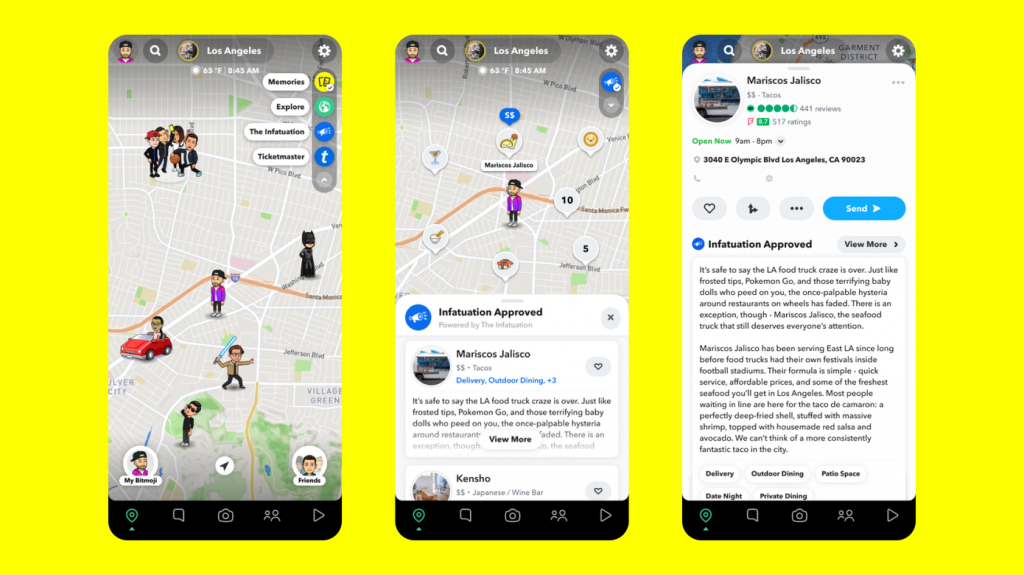
While products like Google Maps and Apple Maps have relied on data partners to improve the quality of their contextual insights, Snap hopes to provide users with a more practical approach to mix and match third-party links with their Snap which allows users to create a view of their geographic environment tailored to their interests.
Snap Map has aimed to be a fundamentally social product, designed for people and friends rather than cars and directions. Theoretically, the layers will allow your users some customization when deciding which POIs (point of interest) they want their map to be structured.
Users will be able to rate shows at nearby concert venues and can purchase tickets within the Snapchat app. With The Infatuation, users can scan the map for editorialized recommendations for nearby restaurants with lists and reviews from the site. More of these partnerships are on the way, although it doesn’t appear that Snap is planning to open the floodgates to developers anytime soon.
Snap Inc says that Snap Map has some 250 million monthly active users.
Yuuma
kishimoto at 2021年05月24日 11:00:42
- 2021年05月21日
- 技術情報
TypeScript
TypeScript stands in an unusual relationship to JavaScript. TypeScript offers all of JavaScript’s features, and an additional layer on top of these: TypeScript’s type system.
TypeScript is a modern age JavaScript development language.
There are a lot of benefits of adding static typing to JavaScript. You’ll not see that undefined pop up in your applications anymore. Refactoring code will not be a nightmare anymore. And many more. A study shows that 15% of JavaScript bugs can be detected by TypeScript.
Types — The difference between JS and TS
Programming languages fall into two categories: statically typed or dynamically typed.
Function getWidth(width){
 return num + 3
}
Here, the type of variable width is not known. If I call this with, getWidth(“I love TS”) it will print I love TS3. This is known as type coercion. If it can, Javascript will see that it is trying to add a string and a number together, and it will convert the number to its string equivalent and concatenate them.
With TypeScript, I could do the following:
function getWidth(width: number) {
    return num + 3
}
We just added the type of variable width as a number. If I call add(“I love TS”) now, it’ll throw a compilation error — Argument of type string is not assignable to parameter of type number .
Catching the error instantly allows me to save time and check why my input is not the type I think it is, rather than having to trace my steps back much later in the process without being sure where the error is occurring.
Benefits of Static Typing
- TypeScript is that it offers the ability to add static types to your JavaScript code.
- Static typing allows you to catch errors earlier in the debugging process.
- Adding strict types makes code more readable. A code that speaks for itself can offset the lack of direct communication between team members.
By Ami
kishimoto at 2021年05月21日 10:00:50
- 2021年05月20日
- 技術情報
[Laravel] テキストエリアの入力内容を改行付きで表示する
nishida at 2021年05月20日 10:00:38
 大人が楽しめるヒーリング絵本河童のカパと静かな森
 パワースポット 日本三大神滝布引の滝
 佐藤・広幸ドイツ魂
 Himeji Castle姫路城
 ボイドタイムお知らせアプリVoid Time 〜月を無視できない〜
 撮った写真をカレンダーに撮りカレ
 ライブ壁紙竹田城ライブ壁紙
 赤ちゃんにっこりBaby+Smile
 電子書籍[for iPhone]ターラのアストロロジー
 約100gまで軽くなったVR――ヘッドセットは「メガネ型」へ向かう?
 Windows+WSL2+Docker開発環境のトラブルTips集
 290B級AIをゲーミングPCでローカル実行?「FreeToken」が目指す新しいローカルAI