Windows 11 + Docker / Laravel + Vue.js 環境構築ガイド #5
本記事は Windows 11 + Docker / Laravel + Vue.js 環境構築ガイド #4 の続きです。
開発環境の設定
5-1. Git設定
- Windows の
Zone.Identifier削除:
sudo find . -type f -name '*:Zone.Identifier' -exec rm {} \;
.gitignoreに不要なファイルを追加します。
- 以下を
.gitignoreに追記:
/docker/db/data
※WSL 上のファイル編集のため、Ubuntuターミナルでプロジェクトへ移動し、VS Code を起動します。
cd ~/projects/laravel_project
code .
左下に [WSL: Ubuntu] と表示された状態でVS Codeが起動できれば成功です。
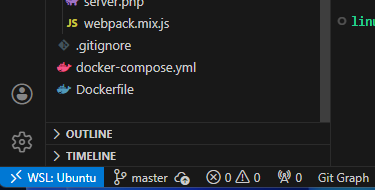
権限で編集・保存ができない場合は以下を実行:
sudo chown -R $USER:$USER .
- Git ユーザー設定(例):
git config --global user.name "山田太郎"
git config --global user.email "yamada@example.com"
5-2. DB接続テスト
.envファイルを編集し、Docker の DB 設定に合わせます。
DB_CONNECTION=mysql
DB_HOST=db
DB_PORT=3306
DB_DATABASE=laraveltestdb
DB_USERNAME=root
DB_PASSWORD=admin
- 接続テスト用ルートを
routes/web.phpに追加します。
use Illuminate\Support\Facades\DB;

Route::get('/dbtest', function () {
    try {
        $result = DB::select('SELECT 1');
        return 'DB接続成功!結果: ' . json_encode($result);
    } catch (\Exception $e) {
        return 'DB接続エラー: ' . $e->getMessage();
    }
});
http://localhost:8000/dbtestにアクセスをおこない 「DB接続成功!」と表示されれば OK です。
次回は、 Docker操作コマンドについて解説します。
木曜日担当:nishida

nishida at 2026年03月12日 10:00:00
 大人が楽しめるヒーリング絵本河童のカパと静かな森
 パワースポット 日本三大神滝布引の滝
 佐藤・広幸ドイツ魂
 Himeji Castle姫路城
 ボイドタイムお知らせアプリVoid Time 〜月を無視できない〜
 撮った写真をカレンダーに撮りカレ
 ライブ壁紙竹田城ライブ壁紙
 赤ちゃんにっこりBaby+Smile
 電子書籍[for iPhone]ターラのアストロロジー
 290B級AIをゲーミングPCでローカル実行?「FreeToken」が目指す新しいローカルAI
 WSL2のDocker環境でMySQLをLaravelとDBeaverから接続する方法
 WindowsのターミナルにもローカルAI―「Intelligent Terminal 0.2」