アプリ関連ニュース
- 2020年11月06日
- 技術情報
[Laravel] Eloquentとページネーション(2)
今回はLaravel標準のO/Rマッパー「Eloquent」を使用したデータ取得方法を紹介したいと思います。本記事は前回の「[Laravel] Eloquentとページネーション(1)」の続きになります。
続きを読む
nishida at 2020年11月06日 10:00:02
- 2020年11月02日
- 技術情報
Composite Design Pattern
Composite is a structural design pattern that allows you to compose objects into tree structures and then work with these structures as if they were individual objects.
The application needs to manipulate a hierarchical collection of “primitive” and “compound” objects. Processing of a primitive object is handled in one way and processing of a composite object is handled differently. You don’t want to have to query the “type” of each object before trying to process it.
Define an abstract base class (Component) that specifies the behavior to be exerted uniformly on all primitive and composite objects. Subclass the Primitive and Composite classes outside of the Component class. Each composite object “docks” itself only with the abstract type component, since it manages its “children”.
Use this pattern whenever you have “compounds that contain components, each of which could be a compound.”
Let’s look at the example I wrote as below.
PHP Code Sample
<?php

/**
 * This is the common interface of the composite pattern, declares the necessary operations here.
 * this might be a set of complex operations under here in a real world application.
 */
interface Common
{
   public function report();
}

/**
 * Leaf class where there is no any children under this.
 */
class Individual implements Common
{
   private $name;
   private $total;

   public function __construct($name,$total)
   {
       $this->name = $name;
       $this->total = $total;
   }
   public function report()
   {
       echo "$this->name got $this->total\n";
   }
}

/**
 * composite class where has complex component structure.
 * getting to each target children to get the final result
 */
class Composition implements Common
{
   public $report_list = [];

   public function addRecord($list)
   {
       $this->report_list[] = $list;
   }

  /**
   * traversing child nodes.
   */
   public function report()
   {
       foreach($this->report_list as $list) {
           $list->report();
       }
   }
}

/**
 * client code can now access both individual and composite class without acknowleding the concrete implementations.
 */
$p1 = new Individual("Mg Mg",100);
$p2 = new Individual("Hla Hla",200);

$list = new Composition();
$list->addRecord($p1);
$list->addRecord($p2);
$list->report();

?>
C# Code Sample
using System;
using System.Collections.Generic;

namespace HelloWorld
{
    /**
     * This is the common interface of the composite pattern, declares the necessary operations here.
     * this might be a set of complex operations under here in a real world application.
     */
    interface Component
    {
        string report();
    }

    /**
     * Leaf class where there is no any children under this.
     */
    class Individual : Component
    {

        private string _name;
        private int _total;

        public Individual(string name,int total)
        {
            this._name = name;
            this._total = total;
        }
        public string report()
        {
            return _name + " got " + _total;
        }
    }

    /**
     * composite class where has complex component structure.
     * getting to each target children to get the final result
     */
    class Composition : Component
    {
        protected List<Component> _lists = new List<Component>();

        public string report()
        {
            int i = 0;
            string result = "";

            foreach (Component component in this._lists)
            {
                result += component.report();
                if (i != this._lists.Count - 1)
                {
                    result += "\n";
                }
                i++;
            }

            return result;
        }

        public void Add(Component component)
        {
            this._lists.Add(component);
        }

    }

    class Program
    {
        static void Main(string[] args)
        {

            /**
             * client code can now access both individual and composite class without acknowleding the concrete implementations.
             */
            var p1 = new Individual("Mg Mg", 100);
            var p2 = new Individual("Hla Hla", 200);

            var list = new Composition();
            list.Add(p1);
            list.Add(p2);
            Console.Write(list.report());
        }
    }

}
By Yuuma.
yuuma at 2020年11月02日 11:00:04
- 2020年10月30日
- 技術情報
[Laravel] Eloquentとページネーション(1)
nishida at 2020年10月30日 10:00:58
- 2020年10月28日
- Apple
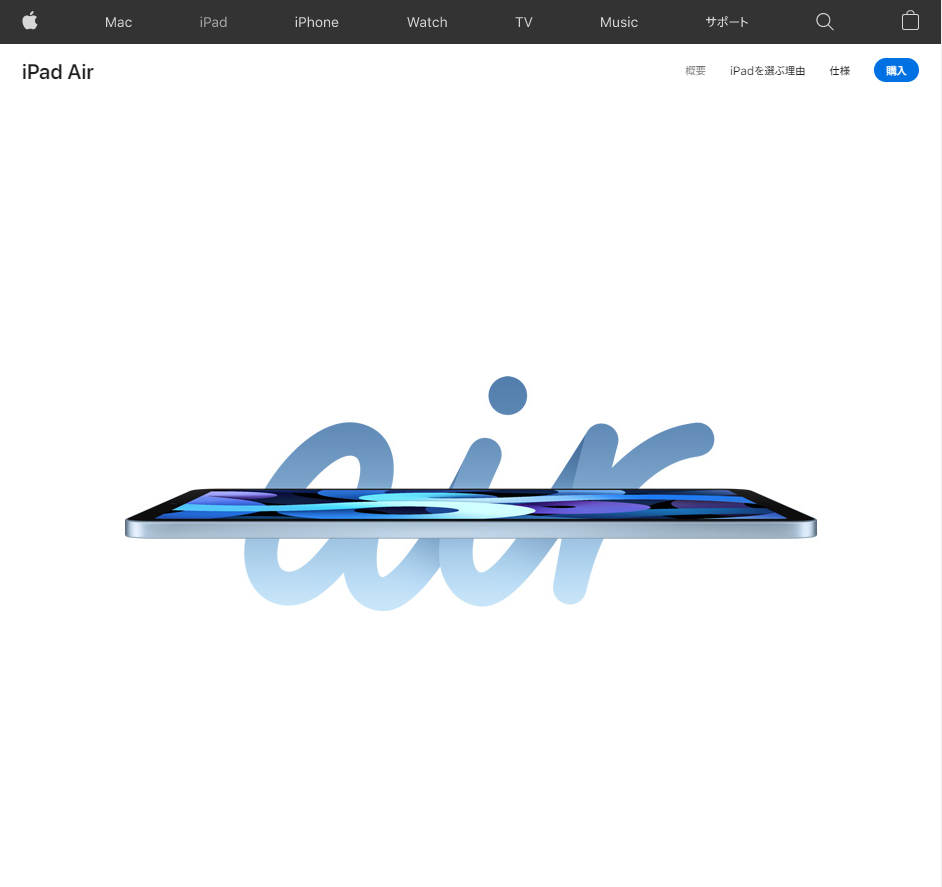
ほぼiPadProなiPadAirが発売
昨日10月27日から第4世代のiPad Airの発売が始まりました。
ホームボタンが無くなったことにより狭ベゼルになり、
見た目はiPad Proにそっくりです。
見た目だけではなく、
iPad ProのようにMagic Keyboadや第2世代Apple Pencilに対応しています。
前世代のiPad AirはApple Pencilを使おうとすると
充電するために本体のLightningポートにApple Pencilを直接挿し込むか
Lightning メスtoメスアダプタを使って充電する必要がありましたが
第2世代Apple Pencilに対応したことで、
本体に磁力でくっつけることで充電することができるようになりました。
個人的に一番うれしいのは、本体の充電ポートがLightningポート から
USB Type-Cポートに変更された事ですね。
Android端末やモバイルPCと充電ケーブルを共有できて
持ち歩くケーブルの本数を減らせます。
電源ボタンを指紋認証センサーとしたのは
Android端末ではよく見かけますが
iPhoneやiPadでは初めてですね。
マスクを着用する機会が多くなったのでホームボタンが無くなっても
指紋認証に対応してくれているのはうれしいですね。
(外出先での使用頻度が高いiPhone 12シリーズにも
ぜひ指紋認証を搭載してほしかったですね。)
本体に加えてApple pencilやMagic Keyboadも合わせて
揃えようとすると10万円以上するのでなかなか手が出しずらいですが、
iPadOSのおかげでモバイルPCとしても使いやすくなったので
良い買い物かもしれませんね。
水曜担当:Tanaka
tanaka at 2020年10月28日 10:00:31
- 2020年10月26日
- 技術情報
Adapter Design Pattern
The adapter is a structural design pattern that enables the collaboration of objects with incompatible interfaces.
You can create an adapter. This is a special object that converts an object’s interface so that another object can understand it.
An adapter wraps one of the objects to hide the complexity of the conversion that occurs behind the scenes. The wrapped object is not even aware of the adapter. For example, you can wrap an object that operates in meters and kilometers with an adapter that converts all data to imperial units such as feet and miles.
Adapters can not only convert data into various formats, they can also help objects with different interfaces to collaborate. Is that how it works:
The adapter gets an interface, compatible with one of the existing objects.
With this interface, the existing object can safely call the adapter’s methods.
Upon receiving a call, the adapter passes the request to the second object, but in the format and order expected by the second object.
Sometimes it is even possible to create a bi-directional adapter that can convert calls in both directions.
Lets look at the example I created as below.
PHP Sample Code
<?php
/**
 * The original interface that is working as normal
 */
interface Socket
{
    public function input();
}
/**
 * This is the simple class that follows the existing target interface `Socket`
 */
class twoPinSocket implements Socket
{
    public function input()
    {
        echo "two pin input";
    }
}
/**
 * This is the conversion class (might be 3rd party service code as well) that will be used later in adapter class.
 */
class conversion
{
    public function changetoThreePin()
    {
        echo "changed to three pin => three pin input";
    }
}
/**
 * This is the adapter class implementing the original target interface linking with conversion class.
 * this will product the format that is second object want.
 */
class threePinSocket implements Socket
{
    private $conversion;
    public function __construct(conversion $conversion)
    {
        $this->conversion = $conversion;
    }
    public function input()
    {
        $this->conversion->changetoThreePin();
    }
}
/**
 * The existing twoPinSocket class that follows the target interface.
 */
$socket = new twoPinSocket();
echo $socket->input();
/**
 * threePinSocket conversion that follows target interface using conversion adapter
 */
$conversion = new conversion();
$socket = new threePinSocket($conversion);
echo $socket->input();
?>
C# Sample Code
using System;
namespace HelloWorld
{
    /**
     * The original interface that is working as normal
     */
    public interface Socket
    {
        string input();
    }
    /**
     * This is the simple class that follows the existing target interface `Socket`
     */
    class TwoPinSocket : Socket
    {
        public string input()
        {
            return "two pin input";
        }
    }
    /**
     * This is the conversion class (might be 3rd party service code as well) that will be used later in adapter class.
     */
    class Conversion
    {
        public string change()
        {
            return "changed 2pin to 3pin";
        }
    }
    /**
     * This is the adapter class implementing the original target interface linking with conversion class.
     * this will product the format that is second object want.
     */
    class ThreePinSocket : Socket
    {
        private readonly Conversion _conversion;
        public ThreePinSocket(Conversion conversion)
        {
            this._conversion = conversion;
        }
        public string input()
        {
            return this._conversion.change();
        }
    }
    public class Program
    {
        public static void Main(string[] args)
        {
            /**
             * The existing twoPinSocket class that follows the target interface.
             */
            Socket socket = new TwoPinSocket();
            Console.WriteLine(socket.input());
            /**
             * threePinSocket conversion that follows target interface using conversion adapter
             */
            Conversion conversion = new Conversion();
            Socket socket = new ThreePinSocket(conversion);
            Console.WriteLine(socket.input());
        }
    }
}
By Yuuma
yuuma at 2020年10月26日 11:00:37
 大人が楽しめるヒーリング絵本河童のカパと静かな森
 パワースポット 日本三大神滝布引の滝
 佐藤・広幸ドイツ魂
 Himeji Castle姫路城
 ボイドタイムお知らせアプリVoid Time 〜月を無視できない〜
 撮った写真をカレンダーに撮りカレ
 ライブ壁紙竹田城ライブ壁紙
 赤ちゃんにっこりBaby+Smile
 電子書籍[for iPhone]ターラのアストロロジー
 Vue.js コンパイルするときのポイント
 翻訳や文字起こしを視界の中へ――AIスマートグラス「INMO GO3」が国内発売